Understanding the Role of a Tattoo Printer in Modern Tattooing
What Is a Tattoo Printer and How It Works
A tattoo printer is a cool digital gadget that puts tattoo designs on stencil paper or right onto skin with super sharp accuracy. Old-school stencils need hand-drawing or clunky machines. But tattoo printers? They use digital files like PNG, JPG, or PDF to make perfect outlines every time. They hook up to tablets, computers, or phones with USB or Bluetooth. That lets artists print designs wicked fast after tweaking them on a screen.
The main trick is inkjet or thermal printing tech. It copies even the fanciest linework. So, artists skip boring hand steps and focus on getting creative and inking.
Why Tattoo Artists Are Turning to Digital Printing Technology
Today’s tattoo artists are jumping on digital printing ‘cause it makes their work super quick and spot-on. Hand-making stencils takes forever and can mess up easy. Tattoo printers, though? They’re fast, steady, and easy to tweak—perfect for tricky geometric shapes or tiny-line art.
Plus, digital printing lets artists edit designs right away with software. That’s a big deal for custom tattoos when clients want last-minute changes.
Benefits of Using a Tattoo Printer for Design Transfer
Using a tattoo printer gives tons of perks:
Precision: High-quality printing nails every line and detail just right.
Time-saving: Artists whip up stencils in seconds, not minutes.
Consistency: Every print looks the same, super important for tattoos that take multiple sessions.
Client satisfaction: Showing the exact outline on skin before inking builds trust and makes clients happy.
These goodies make the tattoo process smoother and keep customers grinning.
Key Tattoo Printer Features That Affect Design Quality
Print Resolution and Its Impact on Fine Line Accuracy
Print resolution, counted in DPI (dots per inch), is a big deal for how clear a printer makes art. Higher DPI means more tiny dots for sharper lines and smoother fades. For styles like realism or micro tattoos where every detail counts, a high-DPI tattoo printer is a must.
Low-DPI printers can blur fancy lines or mess up shapes during transfer. That can goof up the final tattoo’s look.
Ink Compatibility and Color Fidelity
Most stencil printers use black inks for outline transfers. But some fancy models handle color inks for skin previews or temp tattoos. Ink compatibility matters for how well the printer works with stuff like carbon paper or special stencil sheets. It’s gotta keep colors true from screen to skin or paper.
Picking a printer that plays nice with pro-grade inks makes sure what you see matches what you get.
Speed Settings and Their Effect on Workflow Efficiency
Speed settings decide how fast a design prints without losing quality. Adjustable speeds let artists pick quick for simple stuff or careful for fancy designs. A zippy yet sharp machine cuts downtime between clients. That boosts studio work big time.
For busy shops or conventions with tight schedules, this is super handy.
Precision Matters: How Advanced Features Improve Accuracy
The Importance of Alignment Tools in Tattoo Printers
Alignment tools make sure designs land perfect on stencil paper or skin templates. Some printers have built-in grids or laser guides to keep everything lined up just right. This stops wonky transfers that could mess up body symmetry—super key for chest pieces or sleeves that need to flow across body parts.
Adjustable Print Area for Complex Designs
Fancy tattoo printers let you shrink or stretch designs depending on where they go on the body. You can tweak the size without losing clearness. This also helps split huge designs into chunks while keeping them lined up across prints.
Consistency in Output Across Multiple Uses
A solid tattoo printer pumps out the same great results over tons of uses. No fading in quality. That means reprints for touch-ups match the first stencil exactly. It’s a big win for keeping clients happy long-term.
Tough insides like print heads and rollers help keep that steady vibe going.
Choosing the Right Tattoo Printer Based on Your Artistic Needs
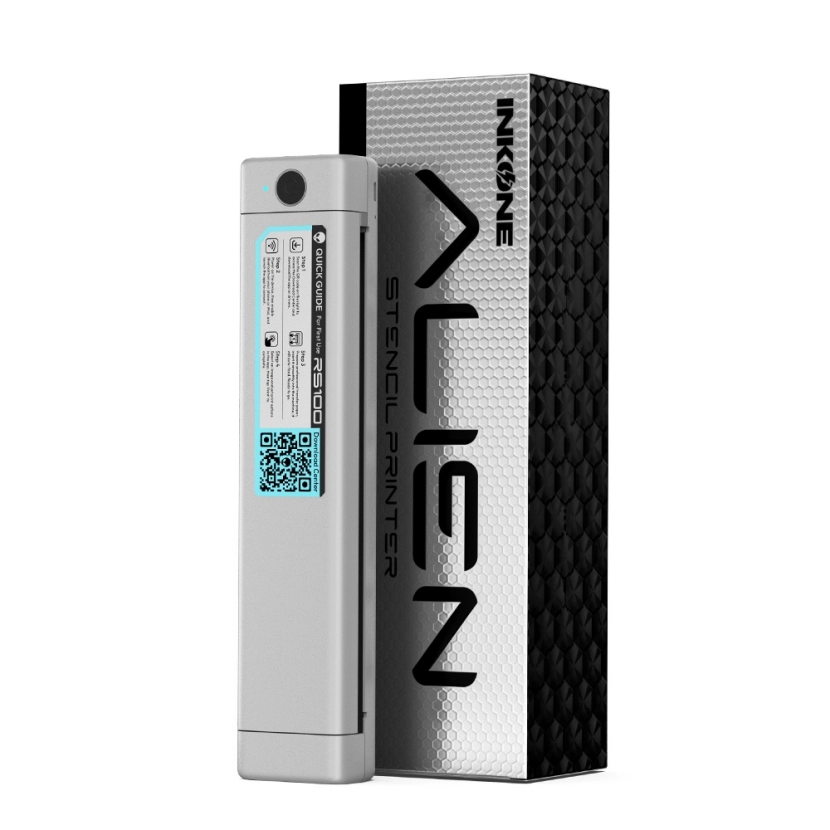
Matching Printer Capabilities with Your Tattoo Style
Different styles need different printer tricks:
Fine-line & realism: Need high resolution for super sharp details.
Traditional & bold line work: Can use medium resolution but need strong contrast.
Color realism: Might want color-capable models for previews or temp tattoos.
Knowing your main style helps pick stuff like DPI range, grayscale skills, and ink types that fit.
Evaluating Software Integration and Design Editing Options
Lots of modern tattoo printers come with their own apps or work with other software. That lets artists tweak designs on the spot before printing. Look for cool features like flipping images, resizing, adjusting brightness, or layering—super useful for custom stencils based on client ideas.
Wi-Fi or Bluetooth makes it wicked easy to run from tablets or phones.
Portability and Ergonomics for Studio or On-the-Go Use
For artists hitting conventions or doing mobile gigs, portability’s a big deal. Small size, light weight, battery power, and tough cases are key to check. Even in tiny studios, a printer that’s easy to move around saves space and makes busy days smoother.
How a High-Quality Tattoo Printer Enhances Client Experience
Faster Stencil Preparation for Shorter Wait Times
Clients love quick work as much as awesome art. A top-notch tattoo printer churns out stencils crazy fast after the design’s okayed. That cuts wait times, makes scheduling easier, and calms clients before the needle starts.
Cleaner Transfers Leading to Better Skin Application
Spot-on transfers give super clear outlines when put on skin with stencil gels. That clearness helps artists during inking. It stays sharp even with tricky lighting or skin that smudges easy.
Reducing Errors with Precise Image Reproduction
Hand-tracing can goof up stuff like eyes being off in portraits—tough to fix once inked. A digital tattoo printer copies designs exactly like on the screen. Every dot and curve’s perfect, so the idea matches the final ink.
What to Consider When Buying a Tattoo Printer from a Trusted Supplier
Material Quality and Build Durability of the Printer Unit
A tough printer made from strong stuff handles tons of use without jamming or getting too hot. Look for ones built with sturdy plastic alloys and heavy-duty insides that can keep up with busy studio life.
That toughness means fewer breakdowns and a longer life—big deal for pro gear.
After-Sales Support and Customization Services Available
A good supplier gives more than just products. They offer warranties, help with fixes, software updates, and even customization services for your art needs. Yiwu Yinke Electric Tools Co., Ltd. Customization Service has pro-led options for building hardware and circuits that fit artists worldwide.
Why Choosing Reliable Brands Like INKONE Ensures Long-Term Value
Yiwu Yinke Electric Tools Co., Ltd., started in 2018, is a pro tattoo gear supplier in Yiwu, China. It’s got easy shipping and global reach. With a solid, skilled team, INKONE rocks at designing and customizing top-quality tattoo equipment. The owner’s a whiz at making circuits, machine parts, and software all by themselves. That means cool, trusted products for pros everywhere.
Frequently Asked Questions About Choosing a Tattoo Printer
What features should I prioritize when choosing a tattoo printer?
Look for high print resolution (DPI), adjustable speed settings, ink compatibility suited for your style (monochrome vs color), software integration capabilities, portability if needed—and always consider build durability from reputable brands like INKONE.
Can I use any type of ink with my tattoo printer?
No; always use inks recommended by your device manufacturer as incompatible inks may damage components or result in poor-quality transfers.
Is wireless connectivity important in a tattoo printer?
Yes; Bluetooth/Wi-Fi connectivity allows seamless file transfer from mobile devices—ideal for quick edits without needing physical cables during busy sessions.
Do all printers support complex design transfers?
Not necessarily; only advanced models offer adjustable print areas large enough for back pieces/sleeves while maintaining fine-line accuracy throughout the image area.
How does using a digital tattoo printer improve client satisfaction?
It reduces wait times through faster stencil creation while improving precision—leading to cleaner applications with fewer errors during actual needlework.
To learn more about our products—or discover how our team at Yiwu Yinke Electric Tools Co., Ltd. delivers industry-leading solutions—feel free to contact us today!