A clean stencil is supposed to feel boring. You place it, it sticks, you line it, done. But when your tattoo transfer fades, or your stencil turns into a purple blur the second you start wiping, the whole session slows down. It also messes with your confidence in the design, even if your hands are solid.
This guide breaks down the most common tattoo transfer paper problems that cause fading, smudging, and “why won’t this stencil stay put?” moments. You will also get quick fixes you can actually use at the station, plus a simple way to diagnose what went wrong without guessing.
Quick Diagnosis: Is It Fading, Smudging, Or Not Sticking?
Most stencil disasters look similar from three feet away. Up close, they behave differently, and the fix changes with it. Do this quick check before you blame the paper, the skin, or your whole day.
How To Tell The Difference In 30 Seconds
- Fading: The stencil looks fine at first, then gets lighter over minutes, especially after light wiping or stretching. This is classic tattoo stencil fading.
- Smudging: Lines smear, double, or bloom when you wipe, stretch, or rest your hand. This is tattoo stencil smudging.
- Not Sticking: The stencil lifts, patches out, or never prints evenly. You see gaps and weak spots right away. That is tattoo stencil not sticking.
Fast Checklist Table
| Symptom You See | Most Likely Cause | Best First Fix |
|---|---|---|
| Light stencil after 5–10 minutes | Skin too wet, stencil not set, weak transfer | Dry longer, reapply with firm pressure, wait before lining |
| Smears the first time you wipe | Too much transfer solution, paper over-saturated | Use less solution, let it flash off, blot instead of wiping |
| Patchy print from the start | Shave debris, oily skin, uneven pressure | Reclean, shave again, reapply with steady pressure |
| Lines look “foggy” | Printer contrast too low, old paper | Increase contrast, use fresh sheets |
When To Restart Instead Of Patching
If the main guide lines are broken, or the stencil has shifted, patching usually wastes more time than restarting. Redoing the stencil is faster than trying to tattoo “through” uncertainty, especially on symmetry-heavy work.
Paper And Printer Issues That Start The Mess
A lot of “skin problems” are actually paper problems that show up on skin. Transfer paper for tattoos is picky about storage, handling, and print settings, even when the design is simple.
Wrong Side, Wrong Stack, Wrong Storage
Tattoo transfer paper is often layered. If layers shift, edges curl, or sheets sit in heat and humidity, the transfer gets weak and inconsistent. Keep sheets flat, sealed, and away from sunlight or heater vents. Also, separate sheets gently. A rough peel can pull pigment where you do not want it.
Thermal Printer Heat And Contrast Settings
If you use thermal paper for tattoo stencils, print settings matter more than people admit. Low contrast prints look “fine” on paper, then fade quickly on skin. Too much heat can also muddy fine lines. A simple rule: if small text and tight curves on the print already look soft, the stencil will not magically sharpen on skin.
Regular Printer Or Hand Stencil: What Changes
Some artists use tattoo stencil paper for printer workflows, others prefer hand stencil tattoo paper. Either way, the transfer stage still needs clean lines and a stable pigment layer. If you are doing manual transfer with carbon paper for tattoo stencil work, watch for pressure spikes. Heavy pressure creates thicker, dirtier lines that smear easier once solution hits the skin.
Skin Prep Mistakes That Kill A Stencil
You can buy professional tattoo transfer paper and still get a bad stencil if skin prep is sloppy. It is not about being “extra,” it is about being consistent.
Too Oily, Too Dry, Too Wet
- Oily: Stencil slides and patches out.
- Too dry: Stencil grabs unevenly and looks grainy.
- Too wet: Stencil looks bold, then your tattoo transfer fades fast because it never set.
After cleaning, the skin should feel clean and matte, not squeaky, not slick. If it shines, it is usually too oily. If it feels damp, it is too wet.
Shaving And Exfoliating Without Irritation
Hair stubble lifts paper and creates gaps. Shave cleanly, wipe away residue, then let the skin calm down for a moment. If you shave aggressively and the skin gets irritated, some transfer solutions grab weirdly and cause uneven printing.
Placement Tricks For High-Movement Areas
Elbows, ribs, shoulders, wrists: these areas stretch and fold. Stretch the skin the way it will sit during tattooing, then place the stencil. If you place on relaxed skin and then stretch later, lines can distort or crack.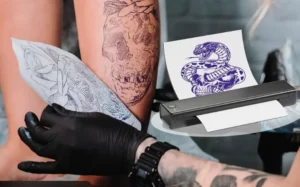
Application Habits That Cause Tattoo Stencil Smudging
Even a perfect print can turn into a mess if the transfer step is rushed. This is where most tattoo transfer paper problems actually happen.
Press Time And Pressure
Press firmly and evenly. No “pecking,” no rocking the paper, no rubbing in circles. You want steady contact. Uneven pressure makes the stencil look bold in one corner and faint in another.
Pull-Off Timing And The “Slide” Problem
Pulling too early often causes blur. Pulling too late can lift parts of the stencil if the paper sticks. Peel slowly, and keep the skin stable. If the stencil shifts as you peel, it is usually too wet or you used too much solution.
Let-It-Set Rule Before The First Line
This sounds basic, but it is the difference between clean lines and frustration. Give the stencil time to set before you start lining. If you start too early, your glove, your hand rest, or the first wipe can trigger tattoo stencil smudging.
Fixes For The Two Most Common Complaints: Tattoo Transfer Fades And Smudges
When things go wrong mid-session, you need fixes that do not turn into a full restart, unless they have to.
If The Tattoo Stencil Fading Happens Mid-Session
- Stop wiping like you are cleaning a window. Use gentle blotting first.
- Stretch less aggressively when checking lines. Over-stretching can make a light stencil disappear faster.
- If you must re-stencil a small section, clean only that area, dry it, and reapply carefully. Avoid soaking the whole stencil zone.
This is also where people search “tattoo transfer paper how to” and “best way to use tattoo transfer paper” because the basics matter most when the stencil is already weak.
If Lines Blow Out When You Wipe
Smudging usually means the stencil never fully set, or there is too much transfer solution sitting on the surface.
- Blot excess moisture before placing the stencil.
- After transfer, let the stencil dry longer.
- During the first few wipes, use lighter pressure and shorter wipes. Less friction, less smear.
If The Tattoo Stencil Not Sticking Keeps Happening
- Reclean the skin and remove any leftover lotion or soap film.
- Check shave debris. Tiny hairs and shaving residue cause patchy transfer.
- Use fresh sheets. Old paper can create weak, inconsistent prints even if the design looks okay on the sheet.
If this is happening repeatedly, you may be dealing with a workflow issue, not a single bad sheet of transfer paper for tattoos.
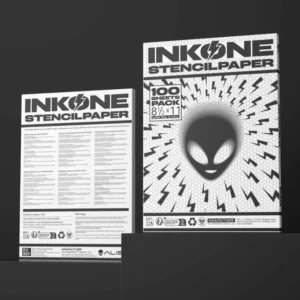
A Practical Supplier For Professional Tattoo Transfer Paper
INKONE is a tattoo equipment supplier established in 2018 and based in Yiwu, China, with a team focused on reliable production and customization support.
The company highlights in-house capability in circuit and machine structure development, with software and hardware work handled internally, which matters when you want stable tools and consistent results across batches. INKONE also supplies a wide range of tattoo equipment, and places heavy attention on production details, quality inspection, packing, and delivery.
For daily studio work, that focus shows up in the small stuff: cleaner packaging, fewer “mystery” defects, and equipment that arrives ready to use. The brand also emphasizes safe, sterile products to help reduce health hazards for both artists and clients.
FAQ
Q1: Why does my tattoo transfer fade even before I start lining?
A: Most of the time, the skin was still damp, or the stencil did not get enough time to set. Dry longer, use less solution, and avoid touching the stencil area right away.
Q2: What causes tattoo stencil smudging the moment I wipe?
A: Too much solution and early wiping are the usual culprits. Blot instead of wipe at first, and keep your first few wipes light and quick.
Q3: Is professional tattoo transfer paper always better than basic sheets?
A: It is usually more consistent, but it still needs correct prep and application. Even great paper will fail on oily skin or rushed transfer steps.
Q4: Can thermal paper for tattoo stencils fix fading issues by itself?
A: It can help with print clarity, but fading can still happen if contrast is low or the stencil is applied on wet skin. Printer settings and skin prep still matter.
Q5: What is the best way to use tattoo transfer paper for small fine-line designs?
A: Print or draw crisp lines, prep skin to a clean matte finish, apply with even pressure, then let it fully dry before lining. Fine lines punish rushing, sadly.